

game controller on work desk

What can instructional designers learn from video game design? This might seem like a silly question—what do video games have to do with learning? Why might we use video games as an inspiration in pedagogy? As instructional designers, faculty often come to us with a variety of problems to address in their course designs—a lack of student interaction, how to improve student application of a given topic, and many more. While there are many tools at our disposal, I’d like to propose an extra tool belt for our kit: what if we thought more like game designers?

Video games excel at creating engaging and motivating learning environments. Hold on a minute, I hear you saying, video games don’t teach anything! In order for games to onboard players, games teach players how to navigate the “physical” game world, use the game’s controls, identify the rules of what is and is not allowed, interpret the feedback the game communicates about those rules, identify the current outcome, form and execute strategies, and a large variety of other things depending on the game, and that’s usually just the tutorial level!

What is the experience like in a learning environment when students begin an online course? They learn how to navigate the course site, use the tools necessary for the course, identify the assessment directions and feedback, identify the short-term and long-term course outcomes, learn material at a variety of different learning levels, and large variety of other things depending on the class, and that’s usually just the first week or two! Sound familiar? What are some things that video games do well during this on-boarding/tutorial to setup players for success? And how might instructional designers and faculty use these elements as inspiration in their classes?

The following list includes nine tips on how game design tackles tutorial levels and how these designs could be implemented in a course design:

  1. Early tasks are very simple, have low stakes, and feedback for these tasks is often very limited—either “you got it” or “try again”. Consider having some low-stakes assignments early in the course that are pass/fail.
  2. If negative feedback is received (dying, losing a life, failing a level, etc.), it is often accompanied by a hint, never an answer. If you have a MCQ, do not allow students to see the correct answer, but consider adding comments to appear if a student selects an incorrect answer that offers hints.
  3. If negative feedback is received, the game does not move on until the current outcome is achieved. Allow multiple attempts on quizzes or assignments and/or setup prerequisite activities or modules.
  4. Game levels allow for flexible time—different players complete levels at different rates. Design tasks with flexible due dates. Many courses already allow some flexibility for students to complete activities and assessments within weekly modules—can that flexibility be extended beyond a weekly time frame?
  5. Tutorial quests usually have predetermined and clearly communicated outcomes. All objectives are observable by both the game and the player. Create outcomes and rubric conditions/language that are self-assessable, even if the instructor will complete the grading.
  6. Tasks and game levels are usually cumulative in nature and progress using scaffolded levels/activities. Consider breaking up large assignments or activities into smaller, more cumulative parts.
    • For example, the first quest in The Elder Scrolls V: Skyrim is a great example for Nos. 5 and 6 above. It consists of four required objectives and two optional objectives:
      • Make your way to the keep.
      • Enter the Keep with Hadvar or Ralof.
      • Escape Helgen.
      • Find some equipment (Hadvar) / Loot Gunjar’s body (Ralof).
        • Optional: Search a barrel for potions.
        • Optional: Pick the lock of a cage.
  7. There are varying degrees of assumed prior knowledge, but no matter what, everyone participates in the tutorial levels. They are not optional. Consider saving optional “side quests” for later in a course or having an introductory module for everyone, regardless of skill level.
  8. The “tutorial” process usually ends when all skills have been introduced, but some games continue to add new skills throughout, inserting mid-game tutorials when necessary. Return to some of the design ideas on this list if a course introduces new topics throughout.
  9. After a requisite number of skills are mastered and players are able to fully play the game, the only major changes in design are increases in difficulty. These changes in difficulty are usually inline with maintaining a flow state by balancing the amount of challenge to the skill level of the player. As course material and activities increase in difficulty, make sure there are ample opportunities for students to develop their abilities in tandem.

Games are a great model for designing engaging learning experiences, with significant research in psychology and education to back it up. By understanding how games are designed, we can apply this knowledge in our course designs to help make our courses more motivating and engaging for our students.

Additional Resources

Want to know more about the psychology of why these designs work? Start with these resources:

Active Learning: What Does the Research Show?

We often hear about new approaches in teaching, and some can take on near-mythical status. That might be the case for active learning. It’s been widely touted as the “most effective” pedagogical approach, but unless you have time to dig through the research, it may not be easy to determine if this trend is applicable – or beneficial – to your teaching and discipline.

So what does the research say about active learning? This article provides a brief summary of research results for active learning applied in STEM subjects.

Why Use Active Learning?

Before we discuss why active learning is beneficial, let’s clarify exactly what active learning is. As opposed to passive learning, such as listening to a traditional lecture, active learning requires students to do something and think about what they are doing (Bonwell & Eison, 1991).

Much research supports the power and benefits of active learning. Students have better retention and understanding when they are actively involved in the learning process (Chickering & Gamson, 1987). Active engagement promotes higher order thinking, since it often requires students to evaluate, synthesize, and analyze information. Research indicates that students develop strong connections, apply concepts to authentic scenarios, and dive deeply into the content, often discovering an unexpected level of engagement that is exciting and stimulating (Nelson, 2002).

Does Active Learning Produce Better Outcomes in STEM?

Research indicates the answer is “yes!” In an introductory physics course, Harvard professor Eric Mazur (2009) found that his students were not able to answer fundamental physics scenarios or grasp basic concepts from traditional lectures. As a result, he stopped lecturing and has become an outspoken champion for active learning.

An organic chemistry class adopted active learning, resulting in significantly higher grades for students in the active classroom than in the control group, with the greatest effect coming from low-achieving students (Cormier and Voisard, 2018). In an introductory undergraduate physics course, two large student groups were compared. The active learning section showed greater attendance, more engagement, and more than double the achievement on an exam (Deslauriers, Schelew and Weiman, 2011).

In 2004, a skeptical Michael Prince (2004) researched the then-current literature on active learning to determine whether it offered consideration for engineering. He found that many active learning recommendations directly conflicted with historical engineering teaching practices. Methods like breaking lectures into small, topic-specific segments, interspersing lecture with discussion, using problem-based scenarios, or grouping students for collaborative learning were uncommon. Ultimately, Prince reluctantly concluded that the bulk of research evidence indicated that these types of teaching methods might foster better retention and enhance critical thinking.

What About Non-STEM Classes?

Although these findings are from research in STEM disciplines, active learning contributes to better grades, more engagement, increased student satisfaction and better retention in any topic (Allen-Ramdial & Campbell, 2014). Active learning tends to increase involvement for all students, not just those already motivated to learn. Peer-to-peer collaboration helps students solve problems and better understand more complex content (Vaughan et al., 2014). Research indicates that students learn more when they actively participate in their education and are asked to think about and apply their learning (Chickering & Gamson, 1987).

Try It Yourself!

The articles cited in this post offer a number of easy-to-implement active learning suggestions that are effective in ether a face-to-face or online classroom. Give one or two a try and see if your students are more engaged in the learning  process.

  • Offer opportunities for students to practice and examine concepts with peers, such as through debates.
  • Break lectures into small, granular topics and intersperse with questions or problem-solving activities based on real-world applications. Video technologies can easily accommodate this approach for online learning.
  • Structure quizzes or other activities to give immediate feedback. Answer keys and auto-graded assessments are available as a feature in virtually any learning management system.
  • Consider “flipping” the classroom by asking students to read or watch lecture videos before in-person class sessions.
  • Design activities that encourage students to work in small groups or collaborate with others.
  • Add a personal reflection component to help students uncover new ideas or insights.

Although no single definitive study has yet been published to unequivocally prove the efficacy of active learning, the body of evidence from many studies forms a compelling argument that it is does offer significant benefits (Weimer, 2012). Give it a try and see how active learning works in your discipline.

Susan Fein, Ecampus Instructional Designer | susan.fein@oregonstate.edu

References

  • Allen-Ramdial, S.-A. A., & Campbell, A. G. (2014, July). Reimagining the Pipeline: Advancing STEM Diversity, Persistence, and Success. BioScience, 64(7), 612-618.
  • Bonwell, C. C., & Eison, J. A. (1991). Active Learning; Creating Excitement in the Classroom (Vol. Education Report No. 1). Washington, D.C.: The George Washington University, School of Education and Human Development.
  • Chickering, A. W., & Gamson, Z. F. (1987, March). Seven Principles for Good Practice. AAHE Bulletin 39, 3-7.
  • Cormier, C., & Voisard, B. (2018, January). Flipped Classroom in Organic Chemistry Has Significant Effect on Students’ Grades. Frontiers in ICT, 4, 30. doi:https://doi.org/10.3389/fict.2017.00030
  • Deslauriers, L., Schelew, E., & Wieman, C. (2011, May). Improved Learning in a Large-Enrollment Physics Class. Science, 332, 862-864.
  • Mazur, E. (2009, January 2). Farewell, Lecture? Science, 323(5910), 50-51. Retrieved from http://www.jstor.org/stable/20177113
  • Nelson, G. D. (2002). Science for All Americans. New Directions for Higher Education, 119(Fall), 29-32.
  • Prince, M. (2004, July). Does Active Learning Work? A Review of the Research. Journal of Engineering Education, 223-231.
  • Vaughan, N., LeBlanc, A., Zimmer, J., Naested, I., Nickel, J., Sikora, S., . . . O’Connor, K. (2014). To Be or Not To Be. In A. G. Picciano, C. D. Dziuban, & C. R. Graham (Eds.), Blended Learning Research Perspectives (Vol. 2, pp. 127-144). Routledge.
  • Weimer, M. (2012, March 27). Five Key Principles of Active Learning. Retrieved from Faculty Focus: https://www.facultyfocus.com/articles/teaching-and-learning/five-key-principles-of-active-learning/

Photo Credits

Auditorium – Photo by Mikael Kristenson on Unsplash
Engagement – Photo by Priscilla Du Preez on Unsplash
Hands – Photo by Headway on Unsplash
Library – Photo by Susan Yin on Unsplash
Contemplation – Photo by sean Kong on Unsplash

“…expertise is learned from prolonged experience with good feedback on mistakes.” – Daniel Kahneman

Students are eager to receive meaningful feedback quickly. With hopes of improving their class performance, timely and substantive feedback is essential to helping students get on track before it is too late. Yet, knowing this doesn’t change why feedback and grading sometimes gets put off, despite our best intentions – it can appear daunting and time consuming.

8 ideas on how to take the sting out of providing feedback:

Self-checks

Not all feedback requires your intervention or even a grade. Can you set-up an activity where students can check their understanding and get immediate feedback? A simple solution is to create a short practice activity (e.g. multiple choice quiz, drag and drop interactive) which provides immediate results. The prompt feedback supports students to move on to more challenging work with confidence. In some systems, including Canvas, you can provide comments for wrong answers that clues them into where they could find the right answer.

Screencasts

As a student, I really enjoyed a course where the faculty member used screencasts to give feedback. I never had to schedule time during her office hours to feel like we were sitting down and having a conversation about my work. Her tone was approachable, I could rewatch the feedback to make sure I understood it, and it was so personal. It was also a nice break from reading text.

When I later heard her share at a faculty training event that she used this method because it was faster than providing text feedback, I was shocked – that had never occurred to me as a student! She has found that by using screencasts she doesn’t have to labor over editing her words to make sure what she is trying to convey doesn’t get interpreted the wrong way. She saves a lot of time by making them intentionally brief and informal, all while providing students an experience that feels relatable and relaxed.

You can check out this Faculty Focus article on Using Screencasts for Formative and Summative Assessment to learn more.

Campus Partners

Could you require students to see a campus partner, like a writing center, to review a first draft of an assignment? Of course, you will want to discuss your idea with these offices before designing your assignments. If they are willing, they can help you by catching a lot of simple errors in students’ work, so you can focus more of your grading on the content in a later iteration. Also, feedback from multiple people broadens the scope of perspectives a student receives, which deepens their learning.

Here at OSU, you might contact the Ecampus Student Success Counselors, OSU Library, Math Learning Center, Online Writing Lab, or other offices to chat about options for partnership.

Self-assessments

You might be surprised how honest students will be about their own work if they are given the opportunity to grade themselves. Providing a rubric and asking students to respond to each criteria can be a helpful way to encourage students to take a moment to step back, reflect on what they have done, and provide suggestions to themselves on how they could improve.

Group feedback

Providing group feedback quickly allows the ‘go getters’ to get started with at least some advice from you while you are finishing giving more specific grades and comments. While you want to use group feedback sparingly, because students need personalized feedback that relates to their specific work, it can help you to prevent a lot of individual email questions. If you are able to offer group feedback that notes class-wide trends more quickly than individual feedback, it shows that you are reviewing the work and paying attention to how students are doing.

Text expanders

Do you often find yourself writing the same types of comments for students over and over? Text expanders allow you to write a small string of text and it expands into a larger piece of text. Some ideas:

  1. APA => Please review the APA in-text citation guidelines at Purdue OWL.
  2. Rubric => See the rubric requirements regarding this section.
  3. Great => This is great work – way to go!
  4. Research => What research are you using as a basis for your claim? What evidence can you provide for this claim?
  5. Replies => This discussion forum required two replies. Please make sure to post at least two replies in subsequent discussion forums to receive full credit.

If you are unsure where to start, check-out this instructor video You Type Too Much! Use a Text Expander To Save Time from Cengage Learning (duration 01:59).

Social pressure

Consider leveraging social pressure through assignments that are public, like e-portfolios or blogs. It’s amazing how much our work improves when we think it will be viewed by others. If students are presenting their work in a public forum, they may take more ownership over the quality, which reduces how much effort is required by you to grade. You will want to check with your instructional designer on how to do this while still adhering to FERPA.

Chocolate

I hate looking at finances, so when it is time to go over my budget, I put on relaxing music and treat myself to a favorite chocolate. If grading is painful, creating a positive ritual around it can make it easier to engage. Are there ways you can make your environment more inviting and focused?

If you are interested in exploring any of these ideas in more detail, contact your instructional designer to discuss what could work for your course and your teaching style. Remember, meaningful feedback will help your students focus on the learning, rather than just the grade.

By: Amy Munger

Fall term is in full swing, and right now students are at their best in terms of motivation and anticipation of a good term and academic year ahead. In a few weeks, however, the motivation that students started out with in September may change to disengagement as the term progresses. Some students, for example, have the misconception that online courses are easier than face-to-face courses. This misunderstanding can cause them to feel overwhelmed and disengaged when they realize that their online courses are just as rigorous as their face-to-face courses. Now is the time to get a jump on ways to spot disengaged students — and what to do about it — before they give up and drop that fabulous online course that you are working so hard on. Here are some key takeaways from a recent workshop on this topic that I attended through the Online Learning Consortium: Strategies for Increasing Interaction & Engagement Self-Paced Workshop

Signs that a student is disengaged:

  • Discussion posts are too short
  • The student rarely logs into the course
  • Little or no time spent participating in activities or interacting with other students
  • Missing or late assignments

Disengaged students may feel isolated and reluctant to reach out for help. Here’s what you can do:

  • Connect with students early and often at the beginning of the course.
  • In your communications with students or in your welcome video, convey to students a sense of community and that the course is a safe space for learning.
  • Encourage students to post their own introductory videos to help everyone get to know each other better.
  • Assign tasks that involve teamwork, which can encourage the development of student relationships that keep students engaged and are essential for learning.
  • Remind students of the many resources that they have through Ecampus, such as the Student Success Team, which include student services, exam proctoring, and success counseling.

What have you experienced in your own courses? What has helped keep students engaged, and what have you done when you have noticed disengagement?


Resources on this topic: 

Engagement Matters: Student Perceptions on the Importance of Engagement Strategies in the Online Learning Environment (Martin & Bollinger, 2018)

Online Learning Consortium, Workshops

OSU Ecampus Student Success Team

The eLearning Dilemma: Engaged vs Unengaged Learners by Karla Guitierrez

Whether you are a new or seasoned online instructor, understanding how to establish and maintain instructor presence is a commonly shared challenge. What is known about online learners is they want to know their instructors are engaged and regularly interacting in the course. Students also express how important it is to know that their instructors care about them.

There is a natural distance inherent in online classrooms which necessitates purposeful actions and intentional structures to prevent isolation and to foster connection. There is great news… this distance can be overcome!  Moreover, research has indicated that instructor presence has a relationship with perceived student satisfaction and success. Being there for your students can make a difference!

Being present goes a step further beyond students perceiving that their instructors are there. By definition, instructor presence is “the design, facilitation, and direction of cognitive and social process for the purpose of realizing personally meaningful and educationally worthwhile learning outcomes.” This may sound like a significant undertaking, but rest assured that you can craft your presence over time and that you have ample support from the Ecampus team. We can help bring your ideas to life!

Keep in mind that curating instructor presence will be an evolution. Learning environments and experiences are dynamic. In addition, the composition of students will change each term, so learner needs and wants will continually shift. Strategies used within a specific context may not work for another, and that is okay.

Let’s get started!

Try starting out small by exploring different ideas. Don’t be afraid to change directions if one approach doesn’t work. With all that said, what are some strategies for establishing and maintaining presence which can be leveraged today?

Establishing presence

  • Welcome announcements
  • Instructor introduction video
  • About your instructor page
  • Course overview video
  • Virtual office hours or individualized virtual sessions to connect with students
  • Personalized language to humanize the learning experience

Maintaining presence

  • Non-graded community building spaces to connect around complex learning activities
  • Announcements to send regular updates, reminders, and check-ins
    • Tip! Announcements can also be leveraged to share and highlight valuable connections, expand upon those insights, and provide relevant resources for learners to explore.
  • Monitor learner progress
    • Regular and timely feedback which is clear and actionable
    • Outreach to learners who are struggling or engagement is lacking
  • Present content in diverse ways
    • Module overview videos
    • Audio recordings (e.g. podcast)
    • Screencast demonstrations
  • Engage in course discussions
  • Solicit student feedback
    • Tip! Consider adding a short anonymous survey in the middle of the course.

As ideas begin to percolate, please do share those with your Instructional Designer so that together you can explore different strategies and tools that will work best for you.

References

  • Budhai, S., & Williams, M. (2016). Teaching Presence in Online Courses: Practical Applications, Co-Facilitation, and Technology Integration. The Journal of Effective Teaching,16(3), 76-84.
  • Ekmekci, O. (2013). Being There: Establishing Instructor Presence in an Online Learning Environment. Higher Education Studies, 3(1), 29-38.
  • Jaggers, S., Edgecombe, N., & West-Stacey, G. (2013, April). Creating an Effective Online Instructor Presence. Retrieved from https://ccrc.tc.columbia.edu/media/k2/attachments/effective-online-instructor-presence.pdf
  • Ladyshewsky, R. K. (2013). Instructor Presence in Online Courses and Student Satisfaction. International Journal for the Scholarship of Teaching and Learning, 7(1). doi:10.20429/ijsotl.2013.070113
  • Sandercock, I. (2014, October 14). The Importance of Instructor Presence in Online Courses. Retrieved from https://teachonline.asu.edu/2014/10/important-instructor-presence-online-course/
  • Smith, T. (2014, September 30). Managing Instructor Presence Online. Retrieved from http://teachonline.asu.edu/2012/08/managing-instructor-presence-online/#more-1069

Active Learning Online – Part 2

The first post about active learning looked at how to include active learning in an online course. You heard about how a history professor used an interactive timeline. Each student added images, facts, and descriptions to the timeline, and the result was a visually-rich historical review. Students had fun while learning about facts and events. This is an example of collaboration and active learning at its best. The second example focused on interactive textbooks as an alternative to printed books. The Top Hat product combined words, images, video, and engaging activities to improve learning and make it more active.

In today’s post we look at two new active learning ideas: mind mapping and annotated reading. Although these two technologies are different from each other, they offer similar benefits. Mind mapping requires the student to visually depict a concept, process, or system. Students label relevant parts or steps, show how these are connected, and identify key relationships. Annotated reading, on the other hand, allows students to enter short comments to passages of text, which encourages peer-to-peer interaction and sharing. While reading, students identify confusing sections, ask (or answer) questions, and interact with others. Both methods actively engage students in the learning process and support them to apply and analyze course concepts.

A Picture is Worth…

You know the famous quip about pictures, so let’s consider how using a visually-based tool for active-learning can support online learners. Wikipedia defines mind mapping as “a diagram used to visually organize information.” Similar tools are concept maps and information maps.

Why are images important for learning? Mind maps help students understand concepts, ideas, and relationships. According to Wikipedia, a meta-study found that “concept mapping is more effective than ‘reading text passages, attending lectures, and participating in class discussions.'” One reason is because mind maps mimic how our brain works. They help us see the “big picture” and make important connections. Not only are mind maps visually appealing, they are also fun to create! Students can work alone or in teams.  This mind map about tennis is colorful and stimulating.

If you want to try mind mapping yourself, here’s a free tool called MindMup. There are many others available, some free and others with modest fees. The Ecampus team created an active learning resources mind map, made with MindMeister. Take a look. There are a lot of great ideas listed. Try a few!

Close Encounters

College student with an open textbookMost classes assign reading to students. Yet reading is a solo activity, so it offers a lower level of active learning. But there are ways to raise reading’s active learning value, with or without technology.

Using a technique called close reading, students get more active learning benefits. Close reading is a unique way to read, usually done with short sections of text. With careful focus, close reading helps students reach a deeper understanding of the author’s ideas, meaning and message.

Three students pointing to laptop screenIf you want to add technology, you can make reading even more active! Using an app called Perusall, reading becomes a collaborative activity. Perusall lets students add comments to the reading and see what others are saying. Students can post questions or respond. Instructors set guidelines for the number of entries and discover which content is most confusing. Originally built for the face-to-face classroom, Perusall is also an effective tool for online learning. Perusall is like social networking in the textbook. It helps students engage with materials and be more prepared to apply the concepts and principles to later assignments. Perusall can be used with or without the close reading technique. 
Want to Try?

Let us know if you have questions or want to try an idea. We are here to help! If you are already working with an Ecampus instructional designer, contact them to ask about these active learning technologies. Or send an email to me, susan.fein@oregonstate.edu, and I’ll be happy to point you in the right direction.

References

Images

Susan Fein, Ecampus Instructional Designer, susan.fein@oregonstate.edu

UDL

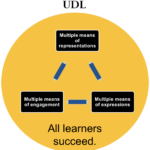
Universal Design for Learning (UDL) is a practical tool for guiding course design to ensure that every learner succeeds, based on scientific insights into how humans learn (cast.org).

As seen from the illustration below, there are three main principles of UDL, namely:

  1. multiple means of representations,
  2. multiple means of engagement, and
  3. multiple means of expressions

UDL

(image by Tianhong Shi, CC0)

There are many applications of UDL design principles in OSU Spring 2018 online courses.

A. Multiple Means of Representations as seen in BA 354 S18’s weekly content planning.

    • reading in text (Chapter 1 of Trevino and Nelson, Managing Business Ethics)
    • listening to podcast (Ponzi Supernova podcast audio from Radio-lab
    • watching instructor lectures in video (Course Introduction)
    • Watching complicated assignment explained in video and graphics:

B. Multiple Means of Engagement as seen in BA 354’s discussion forums and assignment feedback: 

    • Students submit Personal Ethical Action Plan Initial submission – Instructor provides feedback students incorporate feedback from instructor and submit final submission;

Instructor Feedback in Rubrics

  • Discussion forums: students post answers to prompts; students reply to peer classmates’ canvas discussion forum.

C. Multiple Means of Expressions as seen in BB 481/581 S18 and BA 354’s assignments:

  •  3d imageGraphic expression – Assignment #1: Create a three-dimensional image
  • VideoAudio/visual expression – Assignment #2: Create a video to explain what “reciprocal space” mean to you
  •  Text Textual expression – Assignment #3 & #4: Literature search & Quizzes & Discussions & write a letter to a relative to explain why the Fourier transform is so important to NMR spectroscopy
  • ApplicationTextual expression of application – Application type of project: Personal Ethical Action Plan

(Icons from SlidesCarnival’s Solanio template)

If you are interested in applying UDL in your courses, feel free to contact us at  to brainstorm possible applications together.

Sunrise, Eureka, NV, 12/30/2017
Sunrise, Eureka, NV, 12/30/2017, on highway 50, the longliest road in America

Beauty is everywhere and in every moment, if we pay attention. I saw this beautiful sunrise driving by Eureka, Nevada on Highway 50, the loneliest road in America, during the tail of my one-week road trip vacation. Similarly, good teaching practices are flourishing in OSU online courses as we discover from our talks with Ecampus instructors. To inspire you to expand your teaching toolkit, here are some ready to use online teaching tips from the book “Small Teaching: Everyday Lessons from the Science of Learning” by James Lang. 

Teaching Strategies Online Teaching Tips
Retrieving

  • Syllabus Quiz
  • Weekly reading journals
  • Frequent quizzing such as quizlet practices or weekly quizzes
predicting

  • Pretesting with immediate grading and immediate feedback including exposure of content teaching;
  • Role play: how might a person in a different role approach the problem?
  • Asking students to predict what will be covered in next week’s lesson/reading, etc..
 

Interleaving

  • Open or close each class session with small opportunities for students to retrieve older knowledge, to practice skills developed earlier in the course, or to apply old knowledge or skills to new contexts.
  • Weekly mini review session applying that week’s content to some new question or problem.
  • Stagger deadlines and quiz dates to ensure that students benefit from the power of spaced learning.
Connecting

  • Solicit the prior knowledge of your students at the beginning of the term or individual lesson (such as private journaling or public introductory discussion)
  • Ask students to create concept maps that answer questions or solve problems; use concept maps multiple times throughout the semester with different organizational principles.
  • As much as possible, offer examples or cases from everyday or common experience but also – and more importantly – give students the opportunity to provide such examples on their own.
Practicing

  • Before the semester begins, brainstorm a comprehensive list of cognitive skills your students will need to develop to succeed in your course. (Identify Learning outcomes)
  • Prioritize them; decide which ones students will need to develop most immediately and which ones can emerge only after they have developed some basic skills.
  • Review your course schedule and decide where you can make space for small practice sessions in key skills prior to your major assessments; mark those sessions on the syllabus schedule.
  • Prior to any major assessment, ensure that students have had multiple opportunities to practice the skills they will need to do well, from creating slides or writing paragraphs to answering multiple-choice questions.
Self-Explaining

  • For online homework or readings, create spaces for students to self-explain while they work; 
  • When students are demonstrating their homework, create a regular schedule of opportunities or requirements for them to self-explain their process.
  • Use Peer Instruction: students provide an answer, pause and explain it to their peers, and then revise their answers.
  • In all forms of self-explanation, push students to tie their knowledge of information, principles, theories and formula to the specific task they are completing.
Motivating


  • Spend time to get to know your students; learn about their lives and their interests, creating a positive social atmosphere in the virtual class space.
  • Open each lesson by eliciting student emotions: give them something to wonder about, tell them a story, present them with a shocking fact or statistic. Capture their attention and prepare their brains for learning.
  • Consider how practitioners in your field, or the skills you are teaching them, help make a positive difference in the world; remind them continually about the possibilities that their learning can do the same, from the opening of the course.
  • Keep the overarching purpose of any lesson/ learning activity in view while students are working. Make it clear why they are doing this activity.
  • Show enthusiasm for your discipline, for individual texts or problems or units, and for your hope that they will find them as fascinating as you do.
Growing

  • Provide early success opportunities through assignment sequencing or assessment design;
  • Consider offering some reward for effort or improvement in the course (heavier weighting of your assessment toward the latter half or through a portion of the grade set aside for that purpose)
  • Provide examples of initial failures or setbacks in your own intellectual journey or in those of famous or recognizable figures in your field to demonstrate that such failures can be overcome.
  • Give feedback to students in growth language; convey the message that hey are capable of improvement, and offer specific instructions on how to achieve the improvement.
  • Ask top students to write letters to future students about how they succeeded in the course; select and pass along the ones that highlight the power of effort and perseverance.
  • Include a “Tips for Success in this course” section on your syllabus, and refer to it throughout the semester.
Expanding


  • Commit to reading at least one new book on teaching and learning every year.
  • Subscribe to an e-mail list from Faculty Focus or Chronicle of Higher Education
  • Create a personal learning network on Twitter.
  • Attend a conference on Teaching and Learning in higher education (the Teaching Professor  or the Lilly Conference on College and University Teaching)
  • Attend events on campus sponsored by Center for Teaching and Learning.

Lang, J. (2016). Small Teaching: Everyday Lessons from the Science of Learning. San Francisco, CA: JosseyBass.

If you have good strategies for enhancing online teaching and learning, feel free to share with us by email EcampusFacultySupport@oregonstate.edu.

Have a wonderful winter 18 term!

If you are considering developing an online course with Ecampus, you may be curious how you will translate your lectures to the online format. There are several effective online lecture presentation formats available to faculty. They differ in the type of video recording required and the kind of post-production work required after the initial recording.

Image listing 4 formats for online lecture presentation: Video, narrated lecture, light board, and interactive video.
Online Lecture Formats: Qualities & Complexity

Each of the presentation formats can be effective, however the more complex types can offer additional advantages for your students. Why should you consider producing the most challenging of the five online lecture formats? To answer that question, we need to understand what exactly an interactive video lesson is. Let’s start by first looking at a sample interactive video lesson used in a fall 2017 course titled The Biology of Horticulture (HORT 301). You can watch a four minute excerpt of the twenty-minute interactive video lesson by selecting the image below:

Still image from video of Dr. Ryan Contreras teaching using an interactive video lesson in the Biology of Horticulture (HORT 301).
Dr. Ryan Contreras teaching using an interactive video lesson in the Biology of Horticulture course. Select image to watch the four minute video.

As is seen in this excerpt the interactive video lesson has as its foundation a video recording of a Lightboard presentation. Layered over that recording are interactive elements that control video playback—sometimes pausing, other times auto-advancing to specific clips—or to progress through the lesson, trigger a student’s input of feedback, and, most importantly, increase the amount of student engagement in the lesson. In the case of HORT 301 the interactive element prompts the solving of a temperature indices formula. The base video could have been used by itself. However, it is the melding of the Lightboard presentation with the interactive feature that makes the interactive video lesson a highly engaging presentation for the online environment.

The model below proposes how the elements of personal and mediated communication immediacy are brought together to make an interactive video lesson a compelling experience.

Model showing proposing how mediated communication and personal communication of an interactive video complement each other in an interactive video lesson.

In this project instructional design, in conjunction with visual design, video staging, and interaction design, was focused on solving the issue of how to teach a self-paced formula-drive lesson in the online environment. The result is an interactive video lesson that presents as a unified visual space that fosters an actual “see through” psychological perspective. Although clearly a media production, this approach to online lesson presentation implies an unmediated learning experience.

It is enhanced by the camera literally seeing through the Lightboard glass to the instructor conducting the lesson fostering a sense instructor presence. This type of interactive lesson design is desirable because it presents classroom-like learning in a student-controlled online environment. The result is an interactive video lesson that is new in design format but familiar experientially.

Is Interactive Video For You?
A decision to adopt this approach to lesson design will likely be successful if you have a lesson that is formula driven. Certainly math subjects and many science subjects might benefit from this approach. Is it also applicable to humanities courses? Can you imagine teaching language, music, or poetry with an interactive video lesson? If you can, contact Ecampus. We would be glad to help you adopt this approach to lesson design for use in your online course.

Bright red and orange maple leaves against a blue skyResearch supports the value of online student-to-student interaction and building community among learners. Week 1 intro discussions—Let’s get acquainted. Tell us about yourself!—are a staple of interaction among students in online and hybrid courses. Can a Week 1 intro discussion that introduces students to one another also actively engage them in learning course content while building community with peers?

Karen Holmberg, Assoc. Prof. of Creative Writing, uses an “Interview Haiku” exercise in her hybrid WR 241 Introduction to Poetry Writing course that combines students introducing themselves and introducing peers while practicing the popular three-line poetry form.

After being introduced to haiku, syllable counting and marking stresses in the first week, Prof. Holmberg’s students interview partners during an in-class session. (In a fully online course, this step could be done through other means, for instance, in a Google doc or by text or email.) For these intro interviews, she provides a set of six questions such as “Describe your preferred environment: urban, woodland, seaside, desert, etc.?” and “What is your favorite animal and why?”

Text showing portions of interview questionsFollowing the interviews, students write haikus to introduce their interview partners to the class as well as haikus to introduce themselves. Imagine the challenge of introducing someone else, or yourself, in three brief lines!

Each student posts these two intro haikus in an online discussion. Then each student replies to another student by copying and pasting the other student’s two haikus in the reply box and counting and marking the syllables and noting the stressed syllables in the haiku. The instructor can follow up with her students by offering timely feedback individually and collectively through the discussion forum, through comments in the grade book, and in subsequent in-class discussions.

Looking for ideas and effective practices for online discussions that enable learners to share, comprehend, critique and construct knowledge?  Try The Art and Science of Successful Online Discussions.

Do you have an intro discussion assignment that engages learners in course content?

References:

Al-Shalchi, O. N. (2009). The effectiveness and development of online discussions. Journal of Online Learning and Teaching, 5(1). Retrieved from http://jolt.merlot.org/vol5no1/al-shalchi_0309.htm

Palenque, S.M., & DeCosta, M. (2014, August 11). The art and science of successful online discussions. Faculty Focus. Retrieved from http://www.facultyfocus.com/articles/online-education/art-science-successful-online-discussions/

Rubin, B., & Fernandes, R. (2013). Measuring the community in online classes. Journal of Asynchronous Learning Networks, 17(3), 115—136. Retrieved from http://files.eric.ed.gov/fulltext/EJ1018304.pdf