chart of five phases of engagement: connect, communicate, collaborate, co-facilitate, and continue

 Why Group Work Is Important 

Love it or hate it, group work is an important part of education. Learning to work cooperatively with diverse people is a core 21st century skill, one which employers increasingly value and expect new workers to have mastered. Experience gathered from group work in educational settings directly transfers to and prepares students for successful collaboration in work teams. By collaborating in teams, students learn a wide range of discrete as well as soft skills that make group work worth the effort, including those below.

  • Technology skills
  • Social skills
  • Self-awareness
  • Empathy
  • Coping with stress
  • Creating work plans and schedules
  • Forecasting needs and hurdles
  • Time management & meeting deadlines
  • Working with difficult personalities
  • Managing & navigating unmet expectations
  • Following up & messaging
  • Accountability
  • Leadership
  • Development of academic/professional voice 

Pedagogically, group work supports a constructivist approach to learning, in which students contribute to the learning environment, build knowledge both individually and collectively, and co-create the classroom environment. Constructivist theory posits that learning is a social process and values student interaction with and contributions to collective knowledge. Group work and student collaboration are foundational methods in constructivist classrooms that help students develop the knowledge and skills that allow them to meet learning objectives. Additionally, group work is seen as a key element of student-student interaction. 

Considerations for Successful Groups

The first thing instructors should consider when planning to incorporate group work is to reflect on WHY they are assigning it- as an objective of learning or as a means of learning. Group work for the purpose of learning collectively, producing collaboratively, or for gaining experience working cooperatively are all valid reasons to include group work. 

Additionally, instructors must consider the limits of the asynchronous modality when creating group assignments. We all know how difficult it can be if the group you end up working in is not harmonious; For students in asynchronous online courses, group work can be even more difficult, with challenges like different time zones, different daily schedules, and lack of face to face collaboration opportunities. Even the most thoughtfully designed group activities can run into problems. What happens when one student fails to contribute? Do the other group members take up the slack and cover for their absent partner? How should a group handle an overbearing group member who takes on more than their fair share of the project? Anticipating the potential hurdles that may arise when planning the group project and incorporating support and resources for struggling groups can alleviate these barriers to a large degree. 

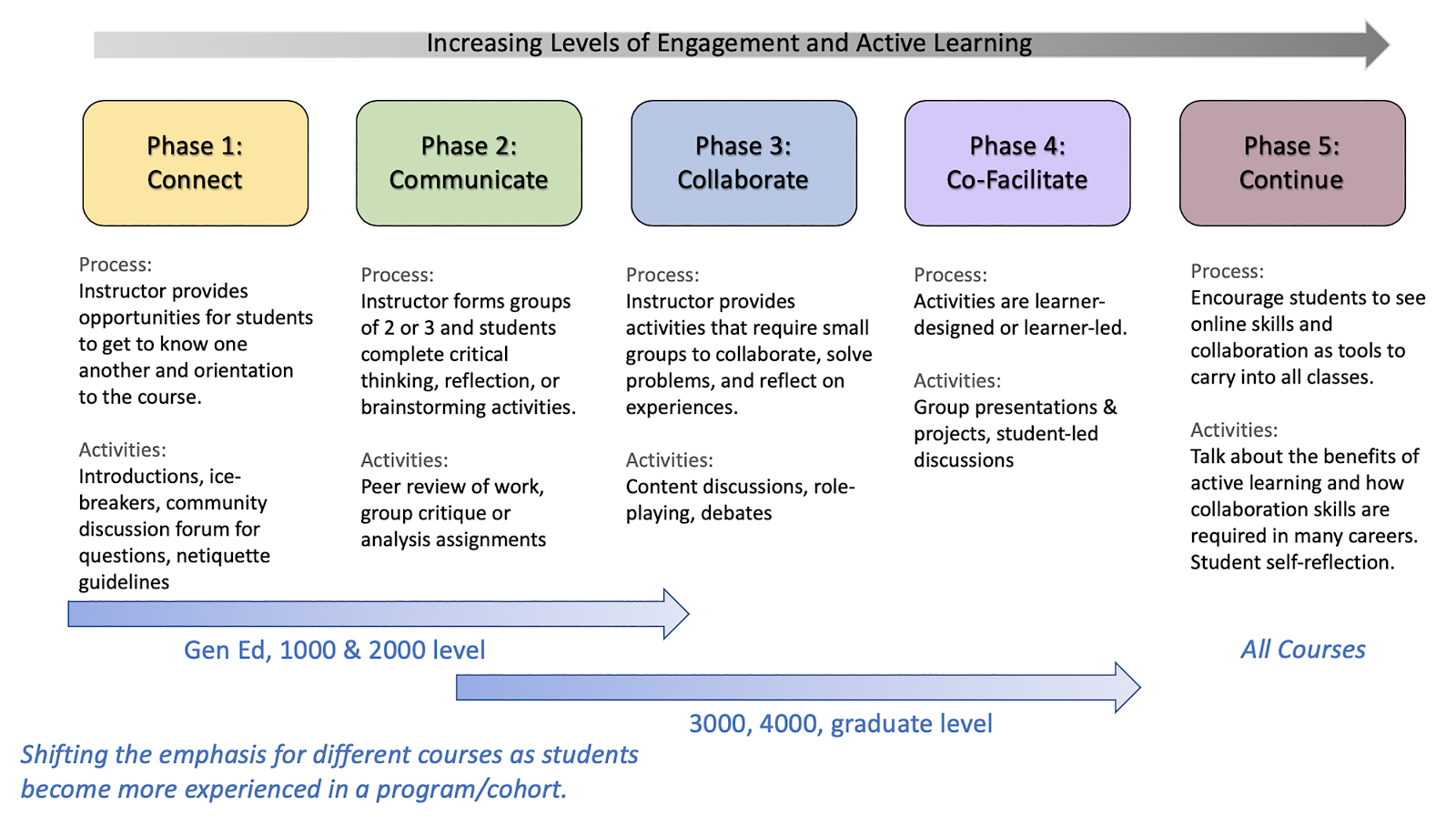
An important consideration when creating group assignments is Conrad & Donaldson’s Phases of Engagement model, which advises instructors to structure group work so that students can build up group cohesion through low-stakes activities like icebreakers, introductions, and discussion forum posting towards the beginning of the term before ramping up to more complicated collaborative projects. This scaffolding of tasks helps groups bond and build community among members, facilitating better working relationships and the trust necessary to work through the intricacies of a complex group project. The theory can be helpful when approaching a series of courses within a specific degree program as well, moving from simple group projects in lower division courses to co-facilitating and transformative ongoing engagement at the upper levels. 

chart of five phases of engagement: connect, communicate, collaborate, co-facilitate, and continue

Another model that can help instructors understand how to structure group work is Peter Lencioni’s Five Dysfunctions of a Team, which describes a pyramid of features that are required for groups to function effectively. Lencioni claims that trust is the foundation of any functioning group, followed in ascending order by managing conflict through healthy discourse, ensuring commitment and buy-in, providing a method of accountability for team members, and a focus on collective results over personal prestige. Avoiding dysfunction by clearly structuring group work to anticipate and provide tools for dealing with these problems can ensure teams get off on the right footing and can work together smoothly.

pyramid of five behaviors of a cohesive team: trust, conflict, committment


Additionally, instructors should consider the type of collaboration that is common within their own discipline, whether it be performing distinct roles within a team or more general projects requiring cooperation. Designers often work together creatively to develop and improve products; medical teams must work collectively but in distinct roles to serve patients; computer software developers must be able to distribute work and manage tight deadlines; public-facing personnel must be able to amicably respond to a range of customer behaviors. Connecting group work explicitly to real-world work scenarios helps students see the value and relevance of their learning, which helps increase engagement and dedication. Structuring group projects to mimic the type of work tasks they can anticipate also provides the added value of preparing students for scenarios they will actually be faced with on the job.

Finally, since asynchronous group work relies heavily on technology, ensure that the technology to be used by the group is familiar or can be mastered quickly. Provide detailed instructions or tutorials for how to use the technology, plan for how to handle issues students might face with technology, and share resources they can tap should they run into problems. University instructional technology support can be linked to, and websites and apps often offer training videos. 

Types of group work

  • Pair/partner work
  • Informal cooperative active learning
  • Group essays or projects
  • Group presentations

Setting groups up for success

  • Set up groups of the right size, preferably with an odd number of participants
  • Make groups heterogenous to encourage peer-to-peer learning
  • Provide opportunities for students to activate their unique background knowledge and perspectives
  • Provide detailed instructions for group interaction expectations
  • Provide guidance on strategies for dividing the workload, such as setting up roles (ie: organizer, recorder, liaison, etc.)
  • Provide detailed instructions and rubrics for expected process and product
  • Split the grade for group work between collective and individual grades
  • Build in check-ins with instructor early on and midway
  • Plan for interventions if groups are not functioning well
  • Allow team members to evaluate each other’s and their own performance for contribution, cooperation, & timeliness

Sources

What are the benefits of group work? – Eberly Center

21st Century Skills Map

Group work as an incentive for learning – students’ experiences of group work

Group work – Teaching practice – Learning and teaching guidance – Elevate – Staff

Transforming The Online Learner

Increasing Student-to-Student Engagement: Applying Conrad and Donaldson’s “Phases of Engagement” in the Online Classroom

Teamwork 5 Dysfunctions


Canvas Survey with Mud Card Questions

New online instructors often express concern about the loss of immediate student feedback they get by teaching in person. These educators count on in-class interaction to help shape their lesson plans in real-time. Student questions, lack of interaction, or even blank looks, help them understand what concepts are difficult for their learners. Others just feel more comfortable with the two-way nature of in-classroom communication.

But teaching in an online environment doesn’t have to be mutually exclusive from gauging student interest and comprehension.

Mud Cards

child in mud puddle in rain boots

I was first introduced to the concept of “Mud Cards” or “Muddiest Points” through an open course MIT offered in Active Learning in College-Level Science and Engineering Courses. The instructor described handing out index cards to each student at the end of class asking students to write down an answer to one or more of a few prompts (MIT OpenCourseWare, 2015).

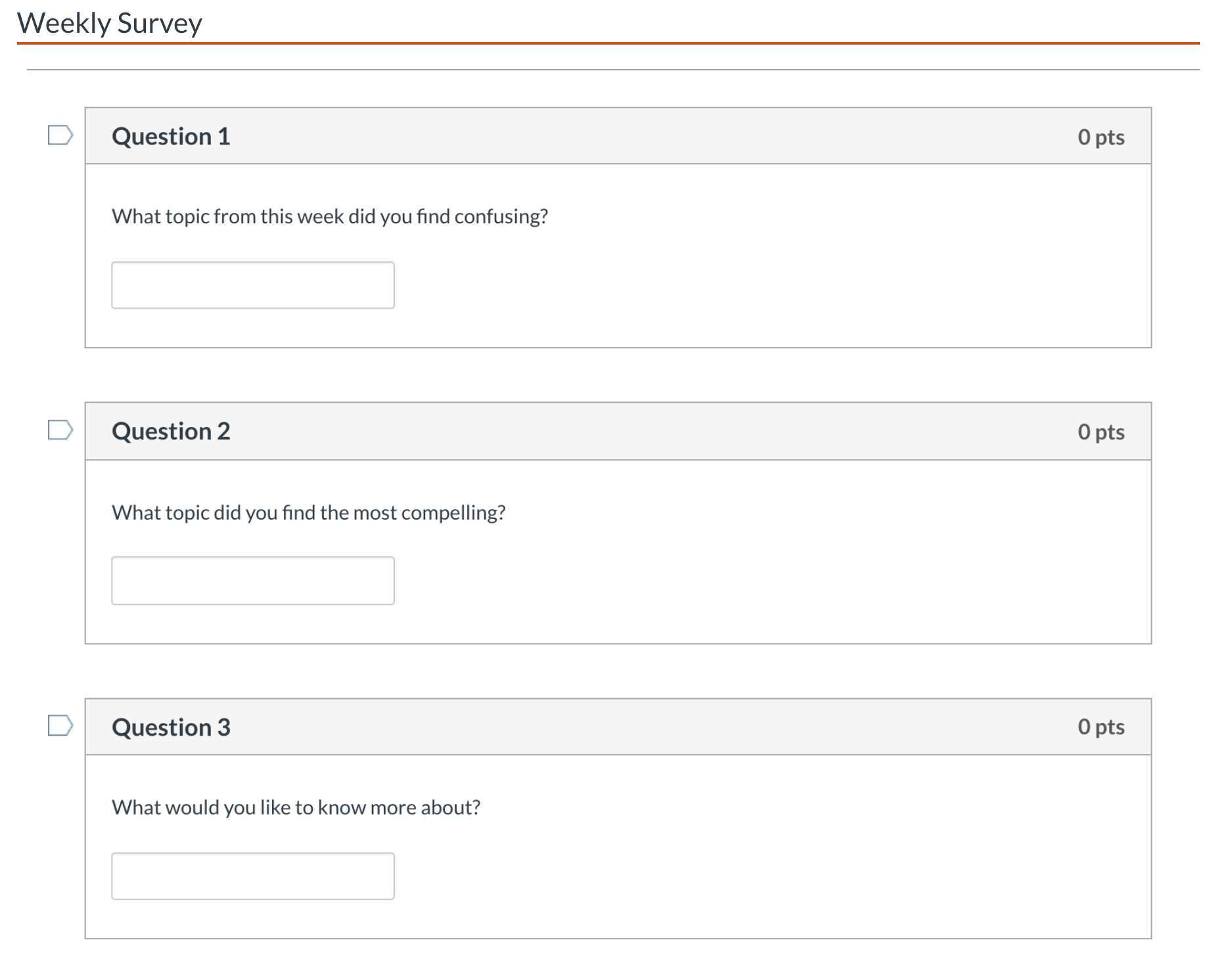
In an online course, this could easily take the form of a weekly survey that looked something like this:

  • What concept from this week did you find confusing?
  • Is there anything you found particularly compelling?
  • What would you like to know more about?

Potential Benefits

The answers received have multiple potential benefits. First of all, instructors will get to look for trends in a particular class.

  • Are learners missing something central to a course learning outcome?
  • Is there a concept they need additional resources to master prior to an upcoming exam?
  • What excites them the most?

Getting this information weekly can provide information that is normally gathered during in-class interactions. It may even be more informative, as participation is likely to be higher (or can be incentivized through participation points). This feedback can be used to add content, perhaps through an announcement at the beginning of the next unit, addressing any common problems students reported. It can also help improve the content or activities for the next iteration of the online course.

The second benefit of an activity like this one is that it is an easy way to introduce active learning to your online course. Active learning, with origins in Constructivism, includes the idea that students build knowledge through “doing things and thinking about what they are doing.”

Rather than passively watching narrated slide-based lectures or videos, or completing assigned readings, they are asked to think about what is being taught to them. Each student, by reflecting on questions like the examples above, takes some responsibility for their own mastery of the content.

3-2-1 (a similar tool)

I recently attended the keynote at the Oregon state Ecampus Virtual Faculty Forum by Tracey Tokuhama-Espinosa (Tokuhama-Espinosa, 2020). At the beginning of her presentation, she told all of us we were going to be asked to email her our “3-2-1.” A 3-2-1, she defined as:

  • Three things that are new to me
  • Two things so interesting I will continue to research or share with someone else
  • One thing I will change about my practices based on the information shared today

Even though I was very familiar with the underlying pedagogical practice she was leveraging, I paid significantly more attention than I would have otherwise to an online presentation. I wanted to come up with something helpful to say. To be honest, suffering from COVID related ZOOM fatigue, it also made sense to ensure the hour of my time resulted in something actionable.

A Word of Caution

The use of a tool like the Mud Cards or 3-2-1 will be successful only if used consistently and students see the results of their efforts. If not introduced early and repeated regularly, students won’t develop the habit of consuming content through the lens of reflecting on their own learning. Similarly, students who never see a response to their input, through a summary or additional explanations, will get the message that their feedback is not important and lose the incentive to continue to provide it.

Conclusion

Introducing a reflection activity like those suggested is a simple, quick way to incorporate active learning into a course while simultaneously filling a void instructors sometimes miss through being able to ask questions of their students in a classroom.

Canvas allows for building anonymous graded or ungraded surveys in which a weekly activity like this would be easy to link to in a list of tasks for a unit of study. It is a low development effort on the part of the instructor, and participation from students shouldn’t take more than 5 minutes.

I will link below to some of the resources mentioned that discuss the use and benefits of Mud Cards and active learning in instruction. If you try it out in an online course, I would love to hear how it works for you.

Resources


Rainboots photo by Daiga Ellaby on Unsplash

About halfway through earning a master’s in education, I took a summer session class on digital storytelling. It ran over the course of three half-day sessions during which we were required to complete two digital stories. I had no great academic ambitions in my approach to these assignments. I was trying to satisfy a degree requirement in a way that worked with my schedule as a single mother of two teenagers working full time while earning a graduate degree.

My first story was a self-introduction. I loved this assignment. Even though I had one evening to complete it, I spent hours tweaking it. I enjoyed learning the tools. I enjoyed sharing my story with my classmates. Even after it was graded, I kept finding ways to improve it.

After completing the course, I began to study the use of digital stories in education. My personal experience had shown me that in completing my assignment I had to become comfortable with technology as well as practiced my writing, speaking and presentation skills. I also felt a stronger connection to my classmates after sharing my video and watching their videos.

Literature

The research on digital storytelling echoes my own experience. Dr. Bernard Robin, an Associate Professor of Learning, Design, & Technology at the University of Houston, discussed the pedagogical benefits of digital storytelling assignments in a 2016 article,  The Power of Digital Storytelling to Support Teaching and Learning. His research found that both student engagement and creativity increased in higher education courses when students were given the opportunity to use multimedia tools to communicate their ideas. Students “develop enhanced communication skills by learning to organize their ideas, ask questions, express opinions, and construct narratives” (Robin, 2016). Bernard’s experience also finds that by sharing their work with peers, students learn to give and accept critique, fostering social learning and emotional intelligence.

Digital Storytelling as Educators

Digital Storytelling in online education shouldn’t be thought of as only a means of creating an engaging student assignment. Educators who are adept at telling stories have a tremendous advantage in capturing their student’s attention. In the following short video, Sir Ian McKellen shares why stories have so much power. Illustrated in the form of a story, he shares that stories are powerful for four reasons. They are a vessel for information, create an emotional connection, display cultural identity, and gives us happiness.

The Power of Storytelling, with Sir Ian McKellen

McKellen is a compelling narrator with a great voice. This story is beautifully illustrated. It reminds me of how I want my learners to feel when they are consuming the content I create. Even if for a moment, so engrossed, that they forget that they are learning. Learning becomes effortless. As he points out, a good storyteller can make the listener feel as if they are also living the story.

Digital Storytelling Assignments

There are lots of ways to integrate digital stories across a broad set of academic subjects. Creating personal narratives, historical documentaries, informational and instructional videos or a combination of these styles all have educational benefits. One of the simplest ways to introduce this form of assessment to your course is to start with a single image digital story assignment.

Here’s an example I created using a trial version of one of many digital story making tools available online:

Single Image Digital Story Example

Digital Story Making Process

The process of creating a digital story lends itself well for staged student projects. Here’s an example of some story making stages:

  1. Select a topic
  2. Conduct research
  3. Find resources and content
  4. Create a storyboard
  5. Script the video
  6. Narrate the video
  7. Edit the final project

I created an animated digital story to illustrate the process of creating a digital story using another freely available tool online.

Digital Storytelling Process Movie link

Recommended Resources & Tools

You will find hundreds of tools available for recording media with a simple search. Any recommended tool should be considered for privacy policies, accessibility and cost to students.

Adobe Express (previously Adobe Spark)

Adobe offers a free online video editor which provides easy ways to add text, embed videos, add background music and narration. The resulting videos can be easily shared online via a link or by downloading and reposting somewhere else. While the tool doesn’t offer tremendous flexibility in design, the user interface is very friendly.

Canvas

Canvas has built-in tools to allow students to record and share media within a Canvas course. Instructions are documented in the OSU Ecampus student-facing quick reference guide.

Audacity

Audacity is a free, open-source cross-platform software for recording and editing audio. It has a steeper learning curve than some of the other tools used for multimedia content creation. It will allow you to export your audio file in a format that you can easily add to a digital story.

Padlet

Padlet allows you to create collaborative web pages. It supports lots of content types. It is a great place to have students submit their video stories. You have a lot of control during setup. You can keep a board private, you can enable comments, and you can choose to moderate content prior to posting. Padlet allows for embedding in other sites – and the free version at the time of writing allows users to create three padlets the site will retain.

Storyboarding Tools

A note first about storyboarding. Storyboarding is an essential step in creating a digital story. It is a visual blueprint of how a video will look and feel. It is time to think about mood, flow and gather feedback.
Students and teachers alike benefit from visualizing how they want a final project to look. It doesn’t have to be fancy. It is much easier to think about how you want a shot to look at this stage than while you are shooting and producing your video. A storyboard is also a good step in a staged, longer-term project in a course to gauge if students are on the right track.

Storyboard That

This is a storyboard creation tool. The free account allows for three and six frame stories. In each frame, you can choose from a wide selection of scenes, characters, and props. Each element allows you to customize color, position, and size. Here’s a sample I created:

The Boords

This site has several free to use templates in multiple formats to support this process. Here is one that I have used before:

A4-landscape-6-storyboard-template

Looking for Inspiration?

Start with Matthew Dicks. Dicks is the author of Storyworthy: Engage, Teach, Persuade and Change Your Life through the Power of Storytelling. He is a teacher. He is a five-time winner of the Moth GrandSlam championship.
His book is wonderful, but to just get a taste, start with the podcast he cohosts with his wife. Each week they include a well-vetted and rehearsed story told during a competition. They then highlight the strengths and areas for improvement. You will walk away with ideas and the motivation to become a better storyteller. Here’s the first episode, and one of my favorites.

Conclusion

When pressed for time to develop course content, we tend to over-rely on text-based assignments such as essays and written discussion posts. Students, when working on Digital Storytelling assignments, get the opportunity to experiment, think creatively and practice communication and presentation skills.

For educators, moving away from presenting learning materials in narrated bulleted slides is likely to make classes more engaging and exciting for their students leading to better learning outcomes. Teachers work every day to connect with students and capture their attention. A good story can inspire your students and help them engage with the content.

I was uncomfortable when I received my first digital storytelling assignment. I didn’t really know how to use the tools, wasn’t confident I knew how or what to capture. I was sure it would feel awkward to narrate a video. But These assignments turned out to be engaging, meaningful, and the process is pretty straight forward. Introduce digital storytelling into your courses, even by starting small, and you are sure to feel the same way.

Introduction

For those who work in higher education, it may not come as a surprise that the field of instructional design has grown in tandem with the expansion of online programs and courses. Evidence of this growth abounds. While the discipline of instructional design has expanded rapidly in recent years, the history of instructional design is not well known by those outside of the field.

This post will cover a brief history of instructional design with a particular emphasis on design: What influences design? How are design decisions made? How has the way we approached design changed over time? We’ll also consider how instructional designers actually design courses and the importance of course structure as an inclusive practice.

Instructional Design: Theory and History

Every instructional design curriculum teaches three general theories or theoretical frameworks for learning: behaviorism, cognitivism, and constructivism. While an instructional designer (ID) probably wouldn’t call herself a cognitivist or a behaviorist, for example, these theories influence instructional design and the way IDs approach the design process.

The field of instructional design is widely believed to have originated during World War II, when training videos like this one were created to prepare soldiers with the knowledge and skills they would need in battle. This form of audio-visual instruction, although embraced by the military, was not initially embraced by schools.

B.F. Skinner
“B.F. Skinner” Portrait Art Print
by Xiquid

In the 1950s, behaviorists, such as B.F. Skinner, dominated popular thought on how to teach and design instruction. For behaviorists, learning results in an observable change in behavior. The optimal design of a learning environment from a behaviorist perspective would be an environment that increases student motivation for learning, provides reinforcement for demonstrating learning, and removes distractions. Behaviorists are always designing for a specific response, and instruction is intended to teach discrete knowledge and skills. For behaviorists, motivation is critical, but only important to the extent that it elicits the desired behavior. 

Cognitivism was largely a response to behaviorism. Cognitivists emphasized the role of cognition and the mind; they acknowledged that, when designing learning environments, there is more to consider than the content to be learned. More than environmental factors and instructional components, the learners’ own readiness, or prior knowledge, along with their beliefs and attitudes, require consideration. Design, from a cognitivist approach, often emphasizes preparedness and self-awareness. Scaffolding learning and teaching study skills and time-management (metacognitive skills) are practices grounded in a cognitivist framework.

While cognitivists emphasize the learner experience, and in particular, acknowledge that learners’ existing knowledge and past histories influence their experience, the learner is still receiving information and acting on it–responding to carefully designed learning environments.

Constructivism, the most current of the three frameworks, on the other hand, emphasizes that the learner is constructing their own understanding of the world, not just responding to it. Learners are activity creating knowledge as they engage with the learning environment.

All–or nearly all–modern pedagogical approaches are influenced by these theoretical frameworks for learning.

Design Approaches

A single course can be seen as a microcosm of theoretical frameworks, historical models, and value-laden judgements of pedagogical approaches

Learning theories are important because they influence our design models, but by no means are learning theories the only factor guiding design decisions. In our daily work, IDs rely on many different tools and resources. Often, IDs will use multiple tools to make decisions and overcome design challenges. So, how do we accomplish this work in practice?

  1. We look to established learning outcomes. We talk about learning goals and activities with faculty. We ask questions to guide decision making about how to meet course learning outcomes through our course design.
  2. We look to research-based frameworks and pedagogical approaches such as universal design for learning (UDL), inclusive design, active learning, student-centered design, and many other models. These models may be influenced by learning theory, but they are more practical in nature.
  3. We look to human models. We often heed advice and follow the examples our more experienced peers.
  4. We look to our own past experiences and solutions that have worked in similar situations, and we apply what we learned to future situations.
  5. We make professional judgements; judgements rooted in our tacit knowledge of what we believe “good design” looks like. For better or for worse, we follow our intuition. Our gut.

Over time, one can see that instructional design has evolved from an emphasis on teaching discrete knowledge and skills that can be easily measured (behaviorism) to an emphasis on guiding unique learners to actively create their own understanding (constructivism). Design approaches, however, are not as straightforward as simply taking a theory and applying it to a learning situation or some course material. Instructional design is nuanced. It is art and science. A single course can be seen as a microcosm of theoretical frameworks, historical models, and value-laden judgements of pedagogical approaches–as well as value-laden judgements of disciplinary knowledge and its importance. But. That’s another blog post.

Design Structure to Meet Diverse Needs

Meeting diverse needs, however, does not necessitate complexity in course design

If learners are unique, if learning can’t be programmed, if learning environments must be adaptable, if learners are constructing their own knowledge, how is all of this accommodated in a course design?

Designing from a modern constructivist perspective, from the viewpoint that students have vastly different backgrounds, past experiences, and world-views, requires that many diverse needs be accommodated in a single course. Meeting diverse needs, however, does not necessitate complexity in course design. Meeting diverse needs means that we need to provide support, so that it is there for those who need it, but not distracting to those who don’t need it. Design needs to be intuitive and seamless for the user.

Recent research on inclusive practices in design and teaching identify structure as an inclusive practice. Design can be viewed as a way of applying, or ensuring, a course structure is present. In that way, working with an instructional designer will make your course more inclusive. But, I digress. Or, do I?

Sathy and Hogan contend, in their guide, that structure benefits all students, but some, particularly those from underrepresented groups, benefit disproportionately. Conversely, not enough structure, leaves too many students behind. Since many of the same students who benefit from additional course structure also succeed a lower rates, providing course structure may also help to close the achievement gap.

How are We Doing This?

The good news is that Ecampus is invested in creating courses that are designed–or structured–in a way that meets the needs of many different learners. Working with an Ecampus instructional designer will ensure that your course materials are clearly presented to your students. In fact, many of the resources we provide–course planning templates, rubrics, module outlines, consistent navigation in Canvas, course banners and other icons and visual cues–are intended to ensure that your students navigate your course materials and find what they need, when they need it.

References

Icons made by phatplus and Freepik from www.flaticon.com are licensed by CC 3.0 BY

Boling, E., Alangari, H., Hajdu, I. M., Guo, M., Gyabak, K., Khlaif, Z., . . . Techawitthayachinda, R. (2017). Core Judgments of Instructional Designers in Practice. Performance Improvement Quarterly, 30(3), 199-219. doi:10.1002/piq.21250

Eddy, S.L. and Hogan, K. A. (2017) “Getting Under the Hood: How and for Whom Does Increasing Course Structure Work?” CBE—Life Sciences Education. Retrieved from https://www.lifescied.org/doi/10.1187/cbe.14-03-0050

Sathy, V. and Hogan, K.A. (2019). “Want to Reach All of Your Students? Here’s How to Make Your Teaching More Inclusive: Advice Guide. Chronicle of Higher Education. Retrieved from https://www.chronicle.com/interactives/20190719_inclusive_teaching

Tanner, K.D. (2013) “Structure Matters: Twenty-One Teaching Strategies to Promote Student Engagement and Cultivate Classroom Equity,” CBE—Life Sciences Education. Retrieved from https://www.ncbi.nlm.nih.gov/pmc/articles/PMC3762997/