
Labs offer an important space for students to apply the knowledge they’ve learned during their course, but can a virtual lab provide the same experience for remote students without access to a physical campus? At OSU’s Ecampus, we hear this question all the time. A student participating in an online lab has an undeniably different experience from one on campus; however, the difference isn’t necessarily a disadvantage. In some cases, an online environment can give students opportunities to interact with equipment, data, and experimental procedures in ways that aren’t possible in a physical lab.
During the development process, course creators often want to replicate every aspect of a physical lab. Some physical aspects can convey important lab techniques, like how to load tubes symmetrically before starting a centrifuge. However, simulating everything that can occur during a lab is not only cumbersome but can also distract from the main learning objectives. Instead, developers should ask themselves, “What do I want students to learn from this lab?” and “How can an online environment improve the learning experience?” For the CHE 417/517 labs, this meant looking beyond simply demonstrating what a student would see in a physical laboratory. The goal was to give students opportunities to operate virtual instruments, make decisions about their experiments, interpret their own results, and learn from mistakes along the way.
There are typically two types of learning when it comes to laboratory assignments: psychomotor skills and conceptual understanding. Psychomotor skills are the hands-on techniques involving handling equipment and performing experimental procedures. Conceptual understanding includes following correct procedures, troubleshooting how machines work, interpreting results, evaluating evidence, and understanding why an instrument produces the results it does. We found that many of the conceptual outcomes can be taught as effectively, or in some cases more effectively, using an online lab environment. An online environment also gives students room to make mistakes without the same consequences they might encounter with physical equipment. For example, the CHE 417/517 simulations can provide feedback when a student’s actions demonstrate a misunderstanding and allow students to return to a previous step and try again whereas in person, you would need to restart the same lab from the beginning to get back to the place of misunderstanding.
Recent Example: CHE 417/517 Labs
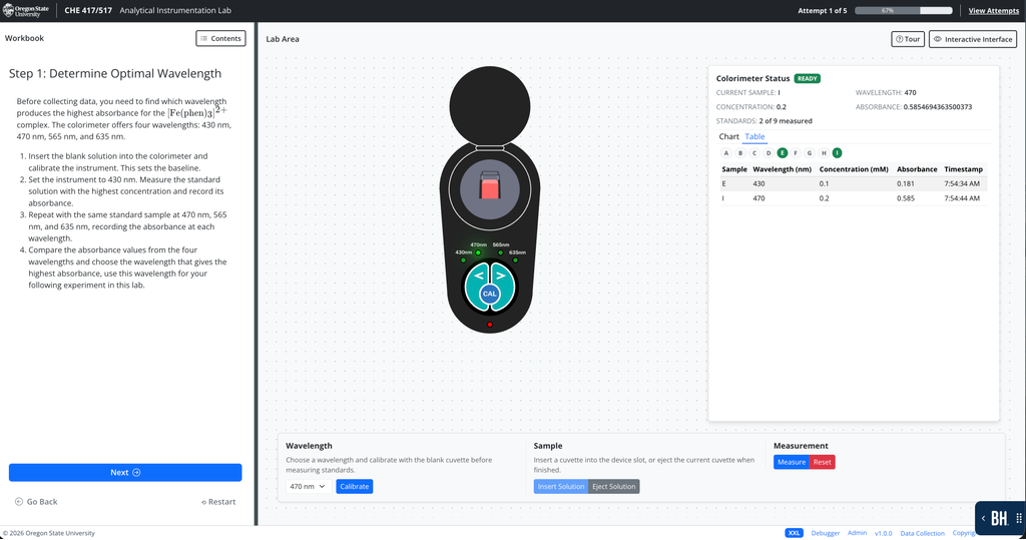
During the Winter and Spring terms of 2026, Ecampus’s CDT Web Team were asked to create four online chemistry labs for the College of Chemical Engineering. The college was concerned about whether students could attain the same level of understanding as they would in an in-person course. The four labs focused on analytical instrumentation and included colorimetric determination of iron in solution, FT-IR with an ATR cell, ICP-AES on water samples, and a calcium ion-selective electrode. What we found was that the online format gave us opportunities to provide instruction and feedback at specific points in the lab. The application could pause at critical moments to give further instruction or provide clear feedback when a student’s actions demonstrated a misunderstanding. Students could also return to certain steps to see where they might have gone wrong and improved their performance on another attempt.
Another important part of the simulations was making the data meaningful to each student. Rather than having every student work from the same canned dataset, the instruments could produce individualized results. Students were given their own unknown concentrations, instrument offsets, or other variables, meaning that two students could perform the same experiment and receive different results. This meant students had to work with and interpret their own data rather than simply following along with an example. We also wanted the instruments to behave more like real instruments rather than producing perfect results every time. The simulations include noise, baseline drift, and occasional outliers. This gives students an opportunity to think about the data they are collecting rather than assuming that every measurement is automatically correct. If a student sees a result that doesn’t fit with the others, they have to consider what happened and decide how to handle that result.
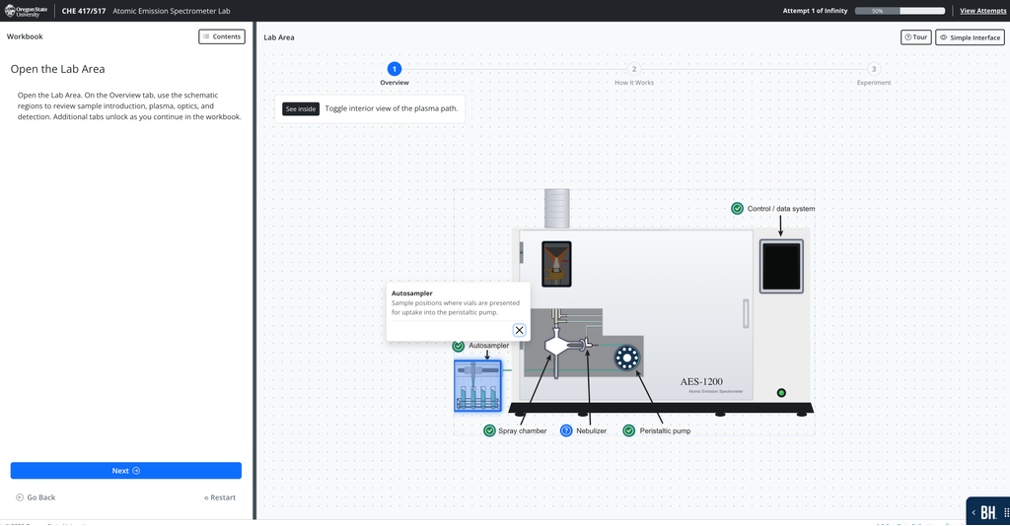
A crucial part of these labs was understanding the equipment that they were working with. In the CHE 417/517 online labs we built each lab with an interactive section that clearly displayed the equipment alongside informative slides. For each interactive equipment section, students/users could click on different parts of the equipment and read informative text to better understand the machinery inside and out. Another layer of effectiveness to the labs that Chris Patenaude implemented was animations. Animations were used to demonstrate key concepts of what was happening during a lab to mimic a similar experience as an in-person student would, and more so for details that might be missed in person during a lab. These animations could be reliably replayed for demonstrative purposes.
Labs For All
Another important benefit of labs being brought online is how much more accessible this learning environment can be. Online web interactives are designed with screen reader compatibility, keyboard navigation, color contrast compliance, and other accessibility features that allow students who might otherwise be unable to complete a lab to successfully engage with, learn, and understand the material. For example, a student with motor skill limitations who may be unable to physically disassemble an Atomic Emission Spectrometer to examine its internal components can instead use the interactive application to explore and understand the instrument’s structure through an accessible, point-and-click interface.
Bringing Expertise Together
There were key skills needed to effectively build the labs. Changqing Pan (CQ) was the subject matter expert who brought the expertise about how the labs worked in person and what the learning objectives were. CQ was key in ensuring that the labs were accurate to the learning material. Frequent feedback and thorough quality assurance testing by CQ helped keep the labs inline with the learning outcomes. The instructional designer, Deborah Mundorff, played an essential role in communicating between the technical chemistry expert and the technical Web Team developers. Deborah collected the content provided by CQ and delivered it to the Web Team in a way that was digestible and helped shaped the online lab flows. Nick Harper on the Web team created accurate and clear image assets for the interaction, and Chris Patenaude implemented the lab design and flow. Chris built the labs in a scalable way, focusing first on a framework that would work for the four labs and then later was able to spend time on the technical equations and interactions with machinery of each of the four labs. I, Tianna Lopes, worked to help bring over the content and instructions to guide the learning and completion of the labs. Along with this core group, support was provided by several others, including the rest of the Web Team, the Instructional Design Team, and members of the Chemistry Department, who contributed to testing and feedback.
Final Thoughts
The four CHE 417/517 labs are examples of what can happen when subject matter expertise, instructional design, and web development come together to rethink what a laboratory experience can look like online. Below are demo links of the four CHE 417/517 labs that were discussed here.
Lab Demonstrations
- Analytical Instrumentation Lab
- Spectroscopy Lab
- Atomic Emission Spectrometer Lab
- Ion Selective Electrode Lab

